
3.9 Developing Algorithms
Learn how to develop algorithms through the Peppa Pig Maze game
🐷 Peppa’s Algorithm Adventures - JavaScript Hacks
Welcome to Peppa’s JavaScript algorithm challenges! Complete these three hacks to master algorithm development with interactive JavaScript examples.
Hack 1: Daddy Pig’s Car Speed Checker 🚗
Help Daddy Pig check if his car is going the right speed using Boolean expressions!
Your task: Complete the missing Boolean conditions to validate car speeds.
%%javascript

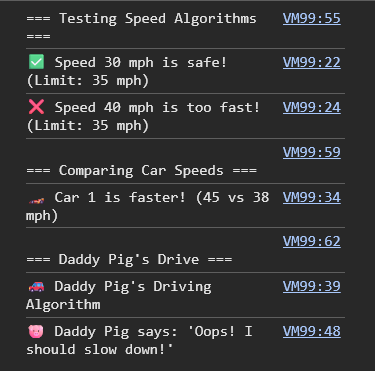
function checkSpeedLimit(currentSpeed, speedLimit) {
    // ✅ Boolean condition: safe if current speed is less than or equal to the limit
    const isSafe = currentSpeed <= speedLimit;

    if (isSafe) {
        console.log(`✅ Speed ${currentSpeed} mph is safe! (Limit: ${speedLimit} mph)`);
    } else {
        console.log(`❌ Speed ${currentSpeed} mph is too fast! (Limit: ${speedLimit} mph)`);
    }

    return isSafe;
}

function compareCarSpeeds(speed1, speed2) {
    // ✅ Boolean expression: car 1 is faster if speed1 > speed2
    const fasterCar = speed1 > speed2 ? "Car 1" : "Car 2";

    console.log(`🏎️ ${fasterCar} is faster! (${speed1} vs ${speed2} mph)`);
    return fasterCar;
}

function daddyPigDriving() {
    console.log("🚗 Daddy Pig's Driving Algorithm");

    const currentSpeed = 35;
    const schoolZoneLimit = 25;

    // ✅ Boolean condition: should slow down if current speed is greater than the limit
    const shouldSlowDown = currentSpeed > schoolZoneLimit;

    if (shouldSlowDown) {
        console.log("🐷 Daddy Pig says: 'Oops! I should slow down!'");
    } else {
        console.log("🐷 Daddy Pig says: 'Perfect speed for the school zone!'");
    }
}

// Test the algorithms (like the lesson does)
console.log("=== Testing Speed Algorithms ===");
checkSpeedLimit(30, 35);
checkSpeedLimit(40, 35);

console.log("\n=== Comparing Car Speeds ===");
compareCarSpeeds(45, 38);

console.log("\n=== Daddy Pig's Drive ===");
daddyPigDriving();
<IPython.core.display.Javascript object>
Hack 2: Suzy Sheep’s Playground Game 🎮
Help Suzy Sheep create a simple playground game using conditional statements!
Your task: Complete the if/else conditions for Suzy’s interactive game.
%%javascript
// Suzy Sheep's playground game algorithm (similar to lesson's decision examples!)
function playgroundEntryChecker() {
console.log("🎪 Suzy's Playground Entry Checker");
const playerAge = 8;
const minimumAge = 5;
const maximumAge = 12;
// ✅ Boolean conditions
const oldEnough = playerAge >= minimumAge;
const youngEnough = playerAge <= maximumAge;
// ✅ Logical AND condition
const canEnter = oldEnough && youngEnough;
if (canEnter) {
console.log(`✅ Welcome to the playground! Age ${playerAge} is perfect!`);
} else {
console.log(`❌ Sorry, age ${playerAge} is not in the range ${minimumAge}-${maximumAge}`);
}
return canEnter;
}
function suzyGameChooser(weather, hasKite) {
console.log("🐑 Suzy's Game Choice Algorithm");
console.log(`Weather: ${weather}, Has kite: ${hasKite}`);
let activity;
// ✅ Fill in the activities
if (weather === "sunny") {
if (hasKite) {
activity = "Flying kites! 🪁";
} else {
activity = "Playing tag with friends! 🏃♀️"; // sunny but no kite
}
} else if (weather === "rainy") {
activity = "Jumping in muddy puddles! 🐷💦"; // rainy day fun
} else {
activity = "Drawing and crafts under the gazebo! 🎨"; // default / cloudy
}
console.log(`🎯 Suzy chooses: ${activity}`);
return activity;
}
function interactivePlaygroundGame() {
console.log("\n🎮 Interactive Playground Test");
// Simulate user choices
const choices = ["sunny", "rainy", "cloudy"];
const randomWeather = choices[Math.floor(Math.random() * choices.length)];
const hasKite = Math.random() > 0.5; // Random true/false
console.log(`🎲 Random scenario: Weather is ${randomWeather}, kite available: ${hasKite}`);
const gameChoice = suzyGameChooser(randomWeather, hasKite);
const canPlay = playgroundEntryChecker();
if (canPlay) {
console.log(`🎉 Suzy is playing: ${gameChoice}`);
} else {
console.log("😢 Suzy can't play today");
}
}
// ✅ Run the playground algorithms
playgroundEntryChecker();
suzyGameChooser("sunny", true);
suzyGameChooser("rainy", false);
interactivePlaygroundGame();
<IPython.core.display.Javascript object>

Hack 3: Pedro Pony’s Simple Navigation System 🧭
Help Pedro Pony navigate around his classroom using boundary checking!
Your task: Complete the Boolean conditions to control Pedro’s movement safely.
%%javascript

function pedroNavigationSystem() {
    console.log("🧭 Pedro's Classroom Navigation Algorithm");

    // Pedro's current position in the classroom
    let pedroX = 1;
    let pedroY = 2;

    // Classroom boundaries (like the lesson's maze boundaries)
    const minX = 0, maxX = 4;
    const minY = 0, maxY = 3;

    console.log(`🐴 Pedro is at desk (${pedroX}, ${pedroY})`);
    console.log(`📚 Classroom size: ${maxX + 1} x ${maxY + 1} desks`);

    // Test different movements
    console.log("\n--- Testing Pedro's Movement ---");

    // Try moving to the whiteboard (right)
    const newX = pedroX + 2;
    // ✅ Pedro can move right as long as he stays within the max X boundary
    const canReachWhiteboard = newX <= maxX;

    console.log(`Move to whiteboard (${newX}, ${pedroY}): ${canReachWhiteboard ? '✅ Can reach' : '❌ Too far'}`);

    // Try moving to the library corner (up)
    const newY = pedroY + 2;
    // ✅ Pedro can move up as long as he stays within the max Y boundary
    const canReachLibrary = newY <= maxY;

    console.log(`Move to library (${pedroX}, ${newY}): ${canReachLibrary ? '✅ Can reach' : '❌ Out of bounds'}`);

    // Try moving to the door (left)
    const exitX = pedroX - 2;
    // ✅ Pedro can move left as long as he stays above or equal to min X
    const canReachDoor = exitX >= minX;

    console.log(`Move to door (${exitX}, ${pedroY}): ${canReachDoor ? '✅ Can reach' : '❌ Would hit wall'}`);
}

function interactiveClassroomNav() {
    console.log("\n🎯 Interactive Classroom Navigation");

    const startX = 2, startY = 1;

    // Simulate different destinations
    const destinations = [
        {name: "teacher's desk", x: 4, y: 0},
        {name: "reading corner", x: 0, y: 3},
        {name: "supply closet", x: 3, y: 2}
    ];

    const randomDest = destinations[Math.floor(Math.random() * destinations.length)];

    console.log(`🎲 Pedro wants to go to: ${randomDest.name} at (${randomDest.x}, ${randomDest.y})`);

    // ✅ Boolean conditions for classroom boundaries
    const validX = (0 <= randomDest.x) && (randomDest.x <= 4);
    const validY = (0 <= randomDest.y) && (randomDest.y <= 3);

    const canNavigate = validX && validY;

    if (canNavigate) {
        console.log(`✅ Pedro successfully navigated to the ${randomDest.name}!`);
    } else {
        console.log(`❌ Can't reach ${randomDest.name} - it's outside the classroom!`);
    }
}

// ✅ Run Pedro's navigation algorithms
pedroNavigationSystem();
interactiveClassroomNav();
<IPython.core.display.Javascript object>

📝 What You Should Complete
After finishing the lesson, you should be able to:
- Hack 1: Fill in the Boolean comparison operators (
<=,>=,<,>) to make Daddy Pig’s speed checker work - Hack 2: Complete the
if/elsestatements and fill in missing activity choices for Suzy’s playground game - Hack 3: Fill in the boundary conditions for Pedro’s classroom navigation system