
Nested Conditionals in Javascript - Homework
Apply your skills of multilayered conditionals and combine all you've learned so far.
Nested Conditionals Homework: Javascript
Complete the following three problems to practice working with nested conditionals. Each problem increases in difficulty. All problems must be completed in JavaScript.
Problem 1: Complete the Shipping Cost Calculator (Easy)
An online store calculates shipping costs based on the order total and membership status. The partially completed code below needs to be finished.
Rules:
- If order total is $50 or more:
- Free shipping for members
- $5 shipping for non-members
- If order total is less than $50:
- $3 shipping for members
- $8 shipping for non-members
Your task: Complete the nested conditional so that when you run the code with the given initial values (orderTotal = 45 and isMember = true), the output shows a shipping cost of $3.
%%js
// Initial conditions - DO NOT CHANGE THESE
let orderTotal = 45;
let isMember = true;
let shippingCost = 0;

console.log(`Order Total: $${orderTotal}`);
console.log(`Member: ${isMember}`);

// YOUR CODE HERE: Complete the nested conditional
if (orderTotal >= 50) {
    if (isMember) {
        shippingCost = 0;
    } else {
        shippingCost = 5;
    }
} else {
    if (isMember) {
        shippingCost = 3;
    } else {
        shippingCost = 8;
    }
}

console.log(`Shipping Cost: $${shippingCost}`);

// Expected output with given values: Shipping Cost: $3
<IPython.core.display.Javascript object>
Javascript Outputs

Problem 2: Build a Restaurant Recommendation System (Medium)
Create a system that recommends a restaurant based on the user’s budget and cuisine preference.
Requirements:
- If budget is “high” (over $30 per person):
- If cuisine is “italian”: recommend “Bella Notte”
- If cuisine is “japanese”: recommend “Sakura Palace”
- For any other cuisine: recommend “The Grand Bistro”
- If budget is “medium” ($15-$30 per person):
- If cuisine is “italian”: recommend “Mario’s Pizzeria”
- If cuisine is “japanese”: recommend “Tokyo Express”
- For any other cuisine: recommend “Downtown Diner”
- If budget is “low” (under $15 per person):
- Recommend “Food Court” regardless of cuisine preference
Your task: Write the complete nested conditional structure. Store the recommendation in the recommendation variable.
%%js
// Test variables
let budgetPerPerson = 10;
let cuisine = "italian";
let recommendation = "";

console.log(`Budget per person: $${budgetPerPerson}`);
console.log(`Preferred cuisine: ${cuisine}`);

// YOUR CODE HERE: Write the complete nested conditional
if (budgetPerPerson > 30) {
  if (cuisine === "italian") {
    recommendation = "Bella Notte";
  } else if (cuisine == "japanese") {
    recommendation = "Sakura Palace";
  } else {
    recommendation = "The Grand Bistro";
  }
} else if (budgetPerPerson >= 15 && budgetPerPerson <= 30) {
  if (cuisine === "italian") {
    recommendation = "Mario's Pizzeria";
  } else if (cuisine === "japanese") {
    recommendation = "Tokyo Express";
  } else {
    recommendation = "Downtown Diner";
  }
} else {
  recommendation = "Food Court";
}


console.log(`\nRecommendation: ${recommendation}`);

// Test your code with these scenarios:
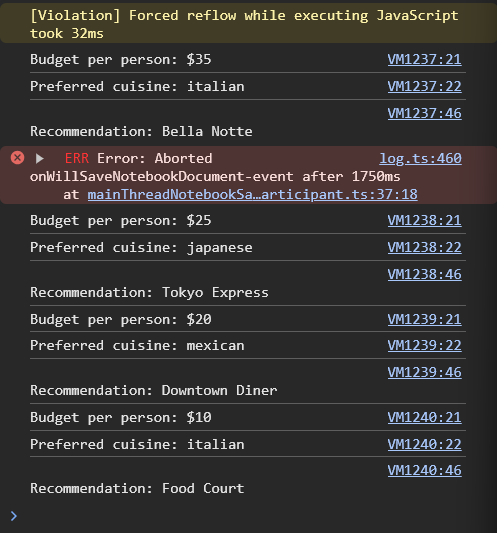
// budgetPerPerson=35, cuisine="italian" → "Bella Notte"
// budgetPerPerson=25, cuisine="japanese" → "Tokyo Express"
// budgetPerPerson=20, cuisine="mexican" → "Downtown Diner"
// budgetPerPerson=10, cuisine="italian" → "Food Court"
<IPython.core.display.Javascript object>
Javascript Output in Console
Problem 3: Design a Smart Home Thermostat System (Hard)
You’re designing the logic for a smart thermostat that automatically adjusts temperature based on multiple factors.
Word Problem:
The thermostat needs to decide what action to take based on:
- Current temperature
- Whether anyone is home
- Time of day (represented as “day” or “night”)
- Energy saving mode (on or off)
Logic Requirements:
- If someone is home:
- During the day:
- If temp is above 75°F: set action to “cooling” and targetTemp to 72
- If temp is below 68°F: set action to “heating” and targetTemp to 70
- Otherwise: set action to “maintaining” and keep current temp
- During the night:
- If temp is above 72°F: set action to “cooling” and targetTemp to 68
- If temp is below 65°F: set action to “heating” and targetTemp to 68
- Otherwise: set action to “maintaining” and keep current temp
- During the day:
- If no one is home:
- If energy saving mode is ON:
- If temp is above 80°F: set action to “cooling” and targetTemp to 78
- If temp is below 60°F: set action to “heating” and targetTemp to 62
- Otherwise: set action to “off” and targetTemp to current temp
- If energy saving mode is OFF:
- Set action to “maintaining” and targetTemp to 70
- If energy saving mode is ON:
Your task: Design the complete nested conditional algorithm from scratch. You’re given the framework below with initial values, but NO code. Write the entire logic yourself.
%%js
// Test variables
let currentTemp = 70;
let isHomeOccupied = false;
let timeOfDay = "night";  // "day" or "night"
let energySavingMode = false;

// Variables to set
let action = "";  // Will be "heating", "cooling", "maintaining", or "off"
let targetTemp = currentTemp;

console.log("=== Smart Thermostat Status ===");
console.log(`Current Temperature: ${currentTemp}°F`);
console.log(`Home Occupied: ${isHomeOccupied}`);
console.log(`Time of Day: ${timeOfDay}`);
console.log(`Energy Saving Mode: ${energySavingMode}`);
console.log();

// YOUR CODE HERE: Write the complete nested conditional algorithm
if (isHomeOccupied) {
  // Someone is home
  if (timeOfDay === "day") {
    if (currentTemp > 75) {
      action = "cooling";
      targetTemp = 72;
    } else if (currentTemp < 68) {
      action = "heating";
      targetTemp = 70;
    } else {
      action = "maintaining";
      targetTemp = currentTemp;
    }
  } else if (timeOfDay === "night") {
    if (currentTemp > 72) {
      action = "cooling";
      targetTemp = 68;
    } else if (currentTemp < 65) {
      action = "heating";
      targetTemp = 68;
    } else {
      action = "maintaining";
      targetTemp = currentTemp;
    }
  }
} else {
  // No one is home
  if (energySavingMode) {
    if (currentTemp > 80) {
      action = "cooling";
      targetTemp = 78;
    } else if (currentTemp < 60) {
      action = "heating";
      targetTemp = 62;
    } else {
      action = "off";
      targetTemp = currentTemp;
    }
  } else {
    action = "maintaining";
    targetTemp = 70;
  }
}


console.log("=== Thermostat Action ===");
console.log(`Action: ${action}`);
console.log(`Target Temperature: ${targetTemp}°F`);

// Test your code with these scenarios:
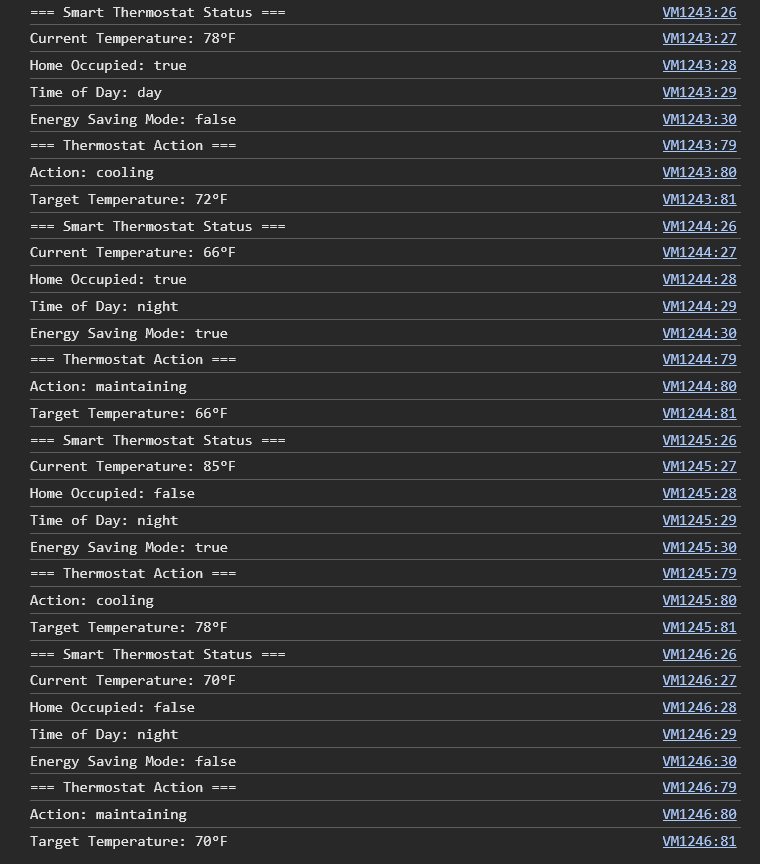
// Scenario 1: currentTemp=78, isHomeOccupied=true, timeOfDay="day", energySavingMode=false
//   → action="cooling", targetTemp=72

// Scenario 2: currentTemp=66, isHomeOccupied=true, timeOfDay="night", energySavingMode=true
//   → action="maintaining", targetTemp=66

// Scenario 3: currentTemp=85, isHomeOccupied=false, timeOfDay="day", energySavingMode=true
//   → action="cooling", targetTemp=78

// Scenario 4: currentTemp=70, isHomeOccupied=false, timeOfDay="night", energySavingMode=false
//   → action="maintaining", targetTemp=70
<IPython.core.display.Javascript object>
Javascript Output in Console
Reflection Questions
After completing all three problems, answer these questions:
- Which problem was the most challenging and why?
- Problem 3 was the most challenging because it required managing multiple factors at once: temperature, occupancy, time of day, and energy-saving mode.
- How did you decide on the structure of your nested conditionals in Problem 3?
- I started by checking the most general condition likr if they were home since that affects all other rules. Then,I added smaller conditionals for time of day and temperature.
- Can you think of a real-world situation where you would need even MORE levels of nesting than Problem 3?
- Yes like in a Tesla, it has to consider traffic signals, object type, speed, and nearby vehicles when making decisions in autopilot.