JS Lab: Library
In this lab, similarly to the Python lab, you’ll be working on a simple “database” for a library to understand CRUD operations in relation to representing redundant, similar data under one structure – an abstraction.
For JavaScript, you’ll have to open the web console from Developer Tools (ctrl + shift + p -> Developer: Toggle developer tools).
%%js
// Our "database" is an array of objects, each representing a book in a library.
// Arrays allow us to store multiple records in a single variable, making it easy to manage collections of data.
let library = [
    { title: "1984", author: "George Orwell", checkedOut: false },
    { title: "To Kill a Mockingbird", author: "Harper Lee", checkedOut: true },
    { title: "The Great Gatsby", author: "F. Scott Fitzgerald", checkedOut: false }
];

// Arrays provide order and allow us to add, remove, or update records efficiently.
// Each element in the array is an object, which abstracts the details of each book.

// Function to display all books
function displayLibrary(lib) {
    console.log("All books in the library:");
    lib.forEach((book, i) => {
        console.log(`Index ${i}:`, book);
    });
}

// Function to add a new book (students: implement prompt and push logic)
function addBook(lib) {
    // TODO: Prompt user for title, author, and checkedOut status, then push to library (array)
    // Use array's push() method to add new books.
    // Example:
    let newBook = { title: "New Book", author: "Author Name", checkedOut: false };
    lib.push(newBook);
    console.log("Added new book:", newBook);
    displayLibrary(lib);
}

// Function to find a book by title (students: implement search logic)
function findBook(lib, searchTitle) {
    // TODO: Search for a book with matching title and print it
    // You can loop through the array to find the matching object.
    let foundBook = lib.find(book => book.title === searchTitle);
    if (foundBook) {
        console.log("Found book:", foundBook);
    } else {
        console.log("Book not found:", searchTitle);
    }
}

// Function to update a book's checkedOut status (students: implement update logic)
function updateBook(lib, searchTitle) {
    // TODO: Find book by title and update its checkedOut field
    // Use array indexing to access and update the object.
    let book = lib.find(book => book.title === searchTitle);
    if (book) {
        book.checkedOut = !book.checkedOut; // Toggle checkedOut status
        console.log("Updated book:", book);
    } else {
        console.log("Book not found for update:", searchTitle);
    }
    displayLibrary(lib);
}

// Function to delete a book (students: implement delete logic)
function deleteBook(lib, searchTitle) {
    // TODO: Remove book with matching title from library
    // Use array methods like splice() to delete a book.
    let index = lib.findIndex(book => book.title === searchTitle);
    if (index !== -1) {
        let removedBook = lib.splice(index, 1);
        console.log("Deleted book:", removedBook[0]);
    } else {
        console.log("Book not found for deletion:", searchTitle);
    }
    displayLibrary(lib);
}

// Example usage
displayLibrary(library);
// Students: Uncomment and complete the following as you implement
addBook(library);
findBook(library, "1984");
updateBook(library, "To Kill a Mockingbird");
deleteBook(library, "The Great Gatsby");
<IPython.core.display.Javascript object>
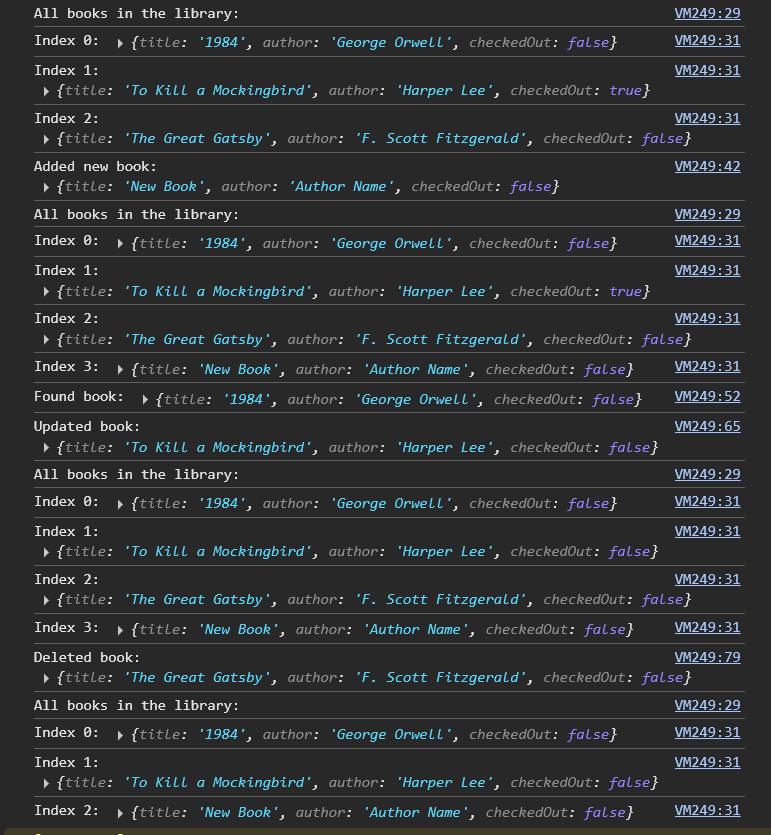
Javascript Outputs for all Hacks